Tiny'Wo | 小窝

网络中的一小块自留地

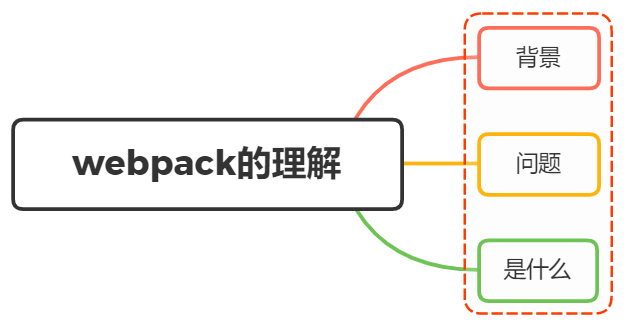
面试官:说说你对webpack的理解?解决了什么问题?

一、背�?

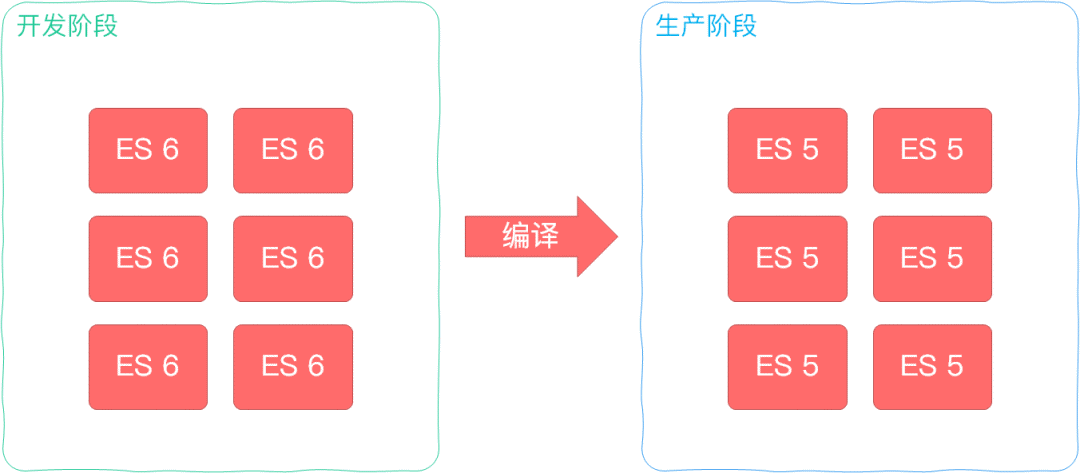
Webpack 最初的目标是实现前端项目的模块化,旨在更高效地管理和维护项目中的每一个资�?

模块�?

最早的时候,我们会通过文件划分的形式实现模块化,也就是将每个功能及其相关状态数据各自单独放到不同的 JS 文件�?
约定每个文件是一个独立的模块,然后再将这些js文件引入到页面,一个script标签对应一个模块,然后调用模块化的成员

1
2
<script src="module-a.js"></script>
<script src="module-b.js"></script>

但这种模块弊端十分的明显,模块都是在全局中工作,大量模块成员污染了环境,模块与模块之间并没有依赖关系、维护困难、没有私有空间等问题

项目一旦变大,上述问题会尤其明�?
随后,就出现了命名空间方式,规定每个模块只暴露一个全局对象,然后模块的内容都挂载到这个对象�?

1
2
3
4
5
window.moduleA = {
method1: function () {
console.log('moduleA#method1')
}
}

这种方式也并没有解决第一种方式的依赖等问�?
再后来,我们使用立即执行函数为模块提供私有空间,通过参数的形式作为依赖声明,如下

1
2
3
4
5
6
7
8
9
10
11
12
13
// module-a.js
(function ($) {
var name = 'module-a'

function method1 () {
console.log(name + '#method1')
$('body').animate({ margin: '200px' })
}

window.moduleA = {
method1: method1
}
})(jQuery)

上述的方式都是早期解决模块的方式,但是仍然存在一些没有解决的问题。例如,我们是用过script标签在页面引入这些模块的,这些模块的加载并不受代码的控制,时间一久维护起来也十分的麻�?
理想的解决方式是,在页面中引入一个JS入口文件,其余用到的模块可以通过代码控制,按需加载进来

除了模块加载的问题以外,还需要规定模块化的规范,如今流行的则是CommonJS ES Modules

二、问�?

从后端渲染的JSPPHP,到前端原生JavaScript,再到jQuery开发,再到目前的三大框架VueReactAngular

开发方式,也从javascript到后面的es5es6�?�?�?�?0,再到typescript,包括编写CSS的预处理器lessscss�?
现代前端开发已经变得十分的复杂,所以我们开发过程中会遇到如下的问题�?

  • 需要通过模块化的方式来开�?- 使用一些高级的特性来加快我们的开发效率或者安全性,比如通过ES6+、TypeScript开发脚本逻辑,通过sass、less等方式来编写css样式代码
  • 监听文件的变化来并且反映到浏览器上,提高开发的效率
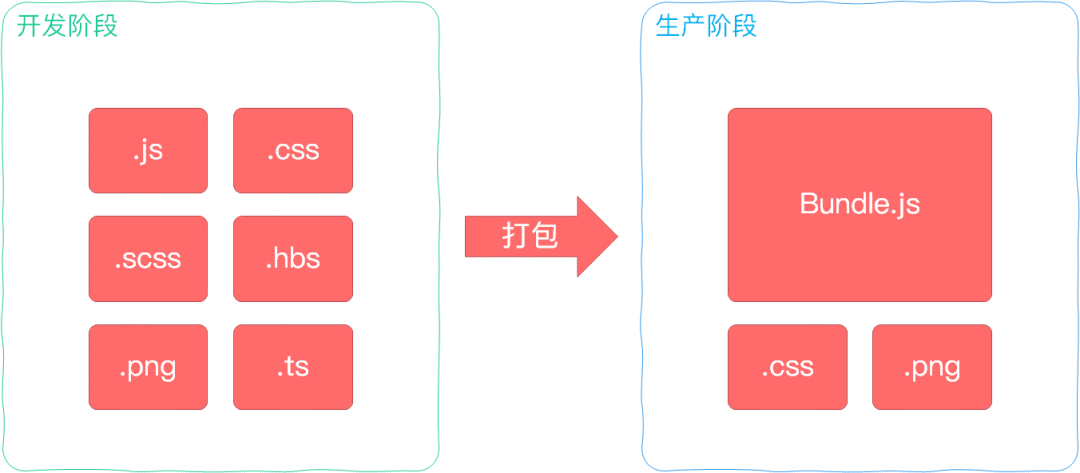
  • JavaScript 代码需要模块化,HTML �?CSS 这些资源文件也会面临需要被模块化的问题
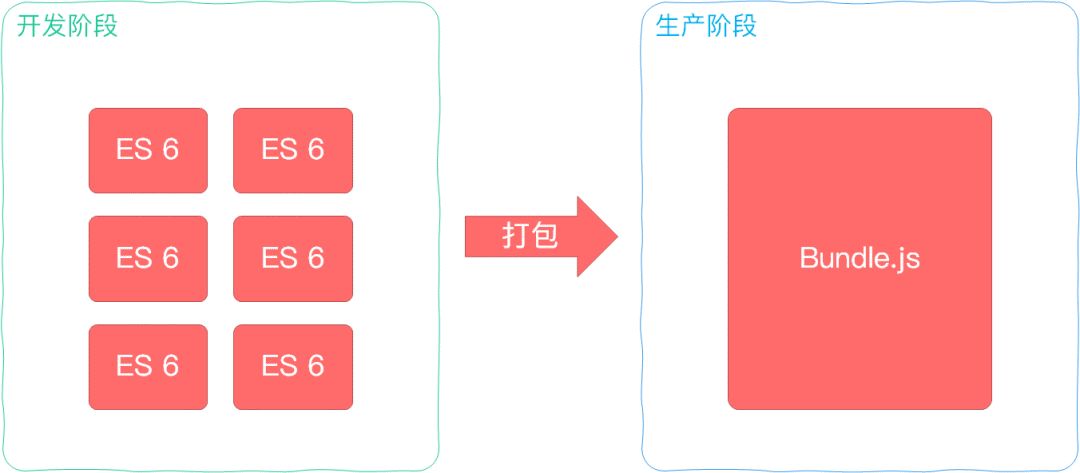
  • 开发完成后我们还需要将代码进行压缩、合并以及其他相关的优化

webpack恰巧可以解决以上问题

三、是什�?

webpack 是一个用于现代JavaScript应用程序的静态模块打包工�?

  • 静态模�?
    这里的静态模块指的是开发阶段,可以�?webpack 直接引用的资源(可以直接被获取打包进bundle.js的资源)

�?webpack 处理应用程序时,它会在内部构建一个依赖图,此依赖图对应映射到项目所需的每个模块(不再局限js文件),并生成一个或多个 bundle

webpack的能力:

编译代码能力,提高效率,解决浏览器兼容问�?
模块整合能力,提高性能,可维护性,解决浏览器频繁请求文件的问题

万物皆可模块能力,项目维护性增强,支持不同种类的前端模块类型,统一的模块化方案,所有资源文件的加载都可以通过代码控制

参考文�?- https://webpack.docschina.org/concepts/

JS 读代�?

读懂面试的代码,才能读懂工作中的代码�?
::: tip
如有疑问,可免费 加群 讨论咨询,也可参�?1v1 面试咨询服务�?专业、系统、高效、全流程 准备前端面试
:::

JS 编译

以下代码,执行结果是什么?

1
2
3
var func = 1
function func() {}
console.log(func + func)

答案

::: details

1
2

这题考察�?GO,也就是全局的预编译�?

  1. 创建 GO 对象
  2. 找变量声明,将变量声明作�?key,值赋�?undefined
  3. 找函数声明,将函数名作为 GO 对象的key,值赋为函数体

编译阶段:创�?GO 对象后,func 作为 key,值为 undefined,然�?func 变成�?函数体,所以在编译结束时,func 还是一�?function

运行阶段:func 被赋值为 1,所�?func + func 就是 2

:::

JS 引用类型

以下代码,执行结果是什么?

1
2
3
4
5
let obj1 = { x: 1 }
let obj2 = obj1
obj2.y = 2
obj2 = { y: 20 }
console.log('obj1', obj1)

答案

::: details

1
obj1 { x: 1, y: 2 }

ECMAScript 变量可能包含两种不同类型的值:基本类型值和引用类型值�?
基本类型包括:Undefined、Null、Boolean、Number、String、Symbol
引用类型包括:Object、Array

引用类型的值是保存在内存中的对象。与其他语言不同,JavaScript 并不允许直接访问内存中的位置,也就是说不能直接操作对象的内存空间。在操作对象时,实际上是在操作对象的引用而不是实际的对象�?
换言之,变量实际保存的是一个指针,这个指针指向放在内存中的对象

当运�?let obj2 = obj1; 的时候,实际上是复制了一份指针,而不是复制了一份对象�?

所�?obj2.y = 2 能够修改对象的值,obj1 能够访问修改后的对象�?
运行 obj2 = { y: 20 }; 时,只是�?obj2 指向了新的对象,obj1 还是指向原来的对象�?:::

JS parseInt

以下代码,执行结果是什么?

1
;['1', '2', '3'].map(parseInt)

答案

::: details

1
[1, NaN, NaN]

查看 MDN 数组�?map 方法,它的参数是一个函数,函数的参数是 (element, index, array)element 是数组的元素,index 是元素的索引,array 是数组本身�?
查看 MDN �?parseInt 函数,它的参数是 (string, radix)string 是要解析的字符串,radix �?2-36 之间的整数,表示被解析字符串的基数�?
所以当遍历的时候,实际效果是:

parseInt(‘1’, 0) // radix 假如指定 0 或未指定,基数将会根据字符串的值进行推算。所以结果为 1�?
parseInt(‘2’, 1) // radix 应该�?2-36 之间的整数,此时�?1,无法解析,返回 NaN

parseInt(‘3’, 2) // radix �?2,表�?2 进制,注意这里不是指将其解析�?2 进制,而是按照 2 进制进行解析,但 3 不是 2 进制里的数字,所以无法解析,返回 NaN
:::

JS this 1

以下代码,执行结果是什么?

1
2
3
4
5
6
7
8
9
const User = {
count: 1,
getCount: function () {
return this.count
},
}
console.log('a ', User.getCount()) // what?
const func = User.getCount
console.log('b', func()) // what?

答案

::: details

1
2
a 1
b undefined

本题考察 this 的指向�?
this 是一个指向对象的指针,this 的指向与所在方法的调用位置有关,而与方法的声明位置无关�?
作为方法调用时,this 指向调用它所在方法的对象;所�?a �?1

作为函数调用时,this 指向 window。所�?b �?undefined.

:::

JS this 2

以下代码,执行结果是什么?

1
2
3
4
5
6
7
8
9
10
11
12
13
14
15
16
17
18
const obj = {
f1() {
const fn = () => {
console.log('this1', this)
}
fn()
fn.call(window)
},
f2: () => {
function fn() {
console.log('this2', this)
}
fn()
fn.call(this)
},
}
obj.f1()
obj.f2()

答案

::: details

1
2
this1 obj �?this1 obj
this2 window(严格模式下�?undefined�?�?this2 window

箭头函数没有自己�?this 对象

对于普通函数来说,内部�?this 指向函数运行时所在的对象,但是这一点对箭头函数不成立。它没有自己�?this 对象,内部的 this 就是定义时上层作用域中的 this。也就是说,箭头函数内部�?this 指向是固定的,相比之下,普通函数的 this 指向是可变的,比如通过 call 来改变�?
obj.f1() 时,fn 是箭头函数,内部�?this 是定义时上层作用域中�?this,也就是 obj。箭头函数修改不�?this,所�?fn.call(window) 不会修改 this 指向�?
obj.f2() 时,fn 是普通函数,�?f2 是箭头函数,如果 f2 是普通函数,该方法内部的 this 指向 obj,但是写成箭头函数,this 指向全局对象,这是因为对象不构成单独的作用域,导致箭头函数定义时的作用域就是全局作用域。所以都�?windows(在非严格模式下)�?
:::

JS 自由变量 1

以下代码,执行结果是什么?

1
2
3
4
5
6
let i
for (i = 1; i <= 3; i++) {
setTimeout(function () {
console.log(i)
}, 0)
}

答案

::: details

1
4 4 4

i 是全局变量,用来控制循环。循环调用了 3 �?setTimeout 延迟执行。当 setTimeout 执行的时候,i 已经变成�?4�?
此外查看 MDN setTimeout,第二个参数�?delay,表示定时器在执行指定的函数或代码之前应该等待的时间,单位是毫秒。如果省略该参数,则使用�?0,意味着“立即”执行,或者更准确地说,在下一个事件循环执行。所以虽然数值设置为 0,但依然是异步行为�?:::

JS 自由变量 2

以下代码,执行结果是什么?

1
2
3
4
5
6
7
8
9
10
11
12
13
14
15
16
let n = 10
function f1() {
n++
function f2() {
function f3() {
n++
}
let n = 20
f3()
n++
}
f2()
n++
}
f1()
console.log('n', n)

答案

::: details

1
n 12

let 声明�?JavaScript 新增了块级作用域。所�?f2 内部�?n �?f2 内部的变量,不会影响外层 n 的变化�?
关于 let 声明可以参�?《ECMAScript 6 入门》let �?const 命令
:::

JS 闭包 1

以下代码,执行结果是什么?

1
2
3
4
5
6
7
8
9
10
const n = 10
function print() {
console.log(n)
}

function f1(fn) {
const n = 20
fn()
}
f1(print)

答案

::: details

1
10

JavaScript 采用词法作用�?lexical scoping),也就是静态作用域。换句话说,说函数的作用域在函数定义的时候就决定了�?
所以当调用 print 的时候,它会根据定义的位置向外查找变量,也就�?n = 10�?
关于词法作用域,参�?《JavaScript 深入之词法作用域和动态作用域》
:::

JS 闭包 2

以下代码,执行结果是什么?

1
2
3
4
5
6
7
8
9
10
11
12
13
function fn() {
let num = 10
return {
set: (n) => (num = n),
get: () => num,
}
}

let num = 20
const { get, set } = fn()
console.log('result1: ', get())
set(100)
console.log('result2: ', num)

答案

::: details

1
10 20

由于 JavaScript 的闭包特性,函数内部的变量可以持续存在�?
所以当调用 get() 的时候,可以访问�?fn 函数作用域中�?num,所�?result1 输出 10�?
set(100)修改的是 fn 函数作用域中�?num,而不是全局�?num�?
所以全局�?num 值,仍然�?20�?:::

JS Promise 1

以下代码,执行结果是什么?

1
2
3
4
5
6
7
8
const promise = new Promise((resolve, reject) => {
console.log(1)
console.log(2)
})
promise.then(() => {
console.log(3)
})
console.log(4)

答案

::: details

1
1 2 4

当创建新�?Promise 时,executor 函数会立即执行,所以打印了 1 �?2�?
promise.then() 注册了一个回调函数,但因�?executor 函数没有调用 resolve �?reject,所�?Promise 永远处于 pending 状态,回调函数不会被执行,所以不会打�?3�?
最后执�?console.log(4),打�?4�?
:::

JS Promise 2

以下代码,执行结果是什么?

1
2
3
4
5
6
7
8
9
10
11
12
13
const promise = new Promise((resolve, reject) => {
console.log(1)
setTimeout(() => {
console.log('timerStart')
resolve('success')
console.log('timerEnd')
}, 0)
console.log(2)
})
promise.then((res) => {
console.log(res)
})
console.log(4)

答案

::: details

1
2
3
4
5
6
1
2
4
timerStart
timerEnd
success

当创建新�?Promise 时,executor 函数会立即执行,所以打印了 1 �?2�?
即使 setTimeout 的延时设置为 0,它的回调函数依然是异步执行的,会被放入宏任务队列,要等到当前所有同步代码执行完毕后才会执行�?
promise.then() 注册了一个回调函数,

按照代码顺序执行 console.log(4),打�?4�?
setTimeout 回调开始执行,打印 timerStart。此时调�?resolve 函数,但 Promise.then 回调也是异步的,所以不会立刻调�?then 函数,而是放入微任务队列。代码继续执行,打印 timerEnd�?
最后开始执行微任务,调�?then 函数,打�?success�?
:::

JS 异步执行顺序 1

以下代码,执行结果是什么?

1
2
3
4
5
6
7
8
9
10
11
12
13
14
15
16
console.log('start')
setTimeout(() => {
console.log('a')

Promise.resolve().then(() => {
console.log('c')
})
})
Promise.resolve().then(() => {
console.log('b')

setTimeout(() => {
console.log('d')
})
})
console.log('end')

答案

::: details

1
start end b a c d

本题涉及同步代码、微任务、宏任务的执行顺序�?
首先执行同步代码,打�?start �?end�?
setTimeout 回调函数会被放入宏任务队列,等待同步代码执行完毕后执行�?
Promise.resolve().then() 注册了一个回调函数,会被放入微任务队列�?
因为微任务优先级高于宏任务,所�?then 回调函数会首先执行,打印 b。回调函数调用了 setTimeout,将函数放入宏任务队列�?
然后执行之前的宏任务,打�?a。然后又注册了一�?then 回调函数,会被放入微任务队列�?
因为微任务优先级高于宏任务,所�?then 回调函数会首先执行,打印 c�?
最后执行宏任务,打�?d�?
:::

JS 异步执行顺序 2

以下代码,执行结果是什么?

1
2
3
4
5
6
7
8
9
10
11
12
13
14
15
16
17
18
19
20
21
22
23
24
25
Promise.resolve()
.then(() => {
console.log(0)
return Promise.resolve(4)
})
.then((res) => {
console.log(res)
})

Promise.resolve()
.then(() => {
console.log(1)
})
.then(() => {
console.log(2)
})
.then(() => {
console.log(3)
})
.then(() => {
console.log(5)
})
.then(() => {
console.log(6)
})

答案

::: details

1
0 1 2 3 4 5 6
  1. 初始状态:

    • 两个 Promise.resolve() 创建两个立即 resolved �?Promise
    • 它们�?.then 回调都被加入到第一轮微任务队列
  2. 第一轮微任务�? - 执行第一个链的第一�?then:打�?0,返�?Promise.resolve(4)

    • 执行第二个链的第一�?then:打�?1
  3. 第二轮微任务�? - 第二个链的第二个 then 执行:打�?2

    • 第一个链的第二个 then 暂时不执行,因为它在等待 Promise.resolve(4) 的解�?4. 第三轮微任务�?
    • 第二个链的第三个 then 执行:打�?3
  4. 第四轮微任务�?

    • Promise.resolve(4) 完成解析
    • 第一个链的第二个 then 执行:打�?4
    • 第二个链的第四个 then 执行:打�?5
  5. 第五轮微任务�? - 第二个链的最后一�?then 执行:打�?6

这道题的难点在于为什�?4 �?3 之后打印,延迟了 2 个微任务才执行�?
这是因为等待 Promise.resolve(4) 的解析需要一个微任务(这期间打印�?2),resolve 过程中发现是 Promise(准确的说是 thenable),V8 会进行一个不同处理,将其入列一个新任务,这期间打印�?3,然后在第四轮微任务中,第一�?Promise 打印 4,第 2 �?Promise 打印 5�?
拓展阅读:promise.then �?return Promise.resolve 后,发生了什么?
:::

JS 手写代码

程序员最重要的就是动手能力�?
::: tip
如有疑问,可免费 加群 讨论咨询,也可参�?1v1 面试咨询服务�?专业、系统、高效、全流程 准备前端面试
:::

手写深拷�?

考虑循环引用

::: details 参考答�?
简单的深拷贝:

1
2
3
4
5
6
7
8
9
10
11
12
13
14
15
16
17
18
function cloneDeep(source, hash = new WeakMap()) {
if (!isObject(source)) return source
if (hash.has(source)) return hash.get(source)

var target = Array.isArray(source) ? [] : {}
hash.set(source, target)

for (var key in source) {
if (Object.prototype.hasOwnProperty.call(source, key)) {
if (isObject(source[key])) {
target[key] = cloneDeep(source[key], hash)
} else {
target[key] = source[key]
}
}
}
return target
}

考虑更多比如爆栈的情况:

1
2
3
4
5
6
7
8
9
10
11
12
13
14
15
16
17
18
19
20
21
22
23
24
25
26
27
28
29
30
31
32
33
34
35
36
37
38
39
function cloneDeep(x) {
const root = {}

const loopList = [
{
parent: root,
key: undefined,
data: x,
},
]

while (loopList.length) {
const node = loopList.pop()
const parent = node.parent
const key = node.key
const data = node.data

let res = parent
if (typeof key !== 'undefined') {
res = parent[key] = {}
}

for (let k in data) {
if (data.hasOwnProperty(k)) {
if (typeof data[k] === 'object') {
loopList.push({
parent: res,
key: k,
data: data[k],
})
} else {
res[k] = data[k]
}
}
}
}

return root
}

参考阅读:

手写 getType 函数

获取详细的变量类�?
::: details 参考答�?

1
2
3
4
5
function getType(data) {
// 获取�?"[object Type]",其�?Type �?Null、Undefined、Array、Function、Error、Boolean、Number、String、Date、RegExp 等�? const originType = Object.prototype.toString.call(data)
// 可以直接截取�?位和倒数第一位,这样就获得了 Null、Undefined、Array、Function、Error、Boolean、Number、String、Date、RegExp �? const type = originType.slice(8, -1)
// 再转小写,得�?null、undefined、array、function �? return type.toLowerCase()
}

:::

手写 class 继承

在某网页中,有三种菜单:button menu,select menu,modal menu�?
他们的共同特点:

  • 都有 title icon 属�?- 都有 isDisabled 方法(可直接返回 false�?- 都有 exec 方法,执行菜单的逻辑

他们的不同点�?

  • button menu,执�?exec 时打�?'hello'
  • select menu,执�?exec 时返回一个数�?['item1', 'item2', 'item3']
  • modal menu,执�?exec 时返回一�?DOM Element <div>modal</div>

请用 ES6 语法写出这三种菜单的 class

::: details 参考答�?

1
2
3
4
5
6
7
8
9
10
11
12
13
14
15
16
17
18
19
20
21
22
23
24
25
26
27
28
29
30
31
32
33
34
35
36
37
38
class BaseMenu {
constructor(title, icon) {
this.title = title
this.icon = icon
}
isDisabled() {
return false
}
}

class ButtonMenu extends BaseMenu {
constructor(title, icon) {
super(title, icon)
}
exec() {
console.log('hello')
}
}

class SelectMenu extends BaseMenu {
constructor(title, icon) {
super(title, icon)
}
exec() {
return ['item1', 'item2', 'item3']
}
}

class ModalMenu extends BaseMenu {
constructor(title, icon) {
super(title, icon)
}
exec() {
const div = document.createElement('div')
div.innerText = 'modal'
return div
}
}

:::

手写防抖 Debounce

::: details 参考答�?

1
2
3
4
5
6
7
8
9
10
11
12
13
14
15
16
17
18
19
20
21
22
23
24
25
26
27
28
29
30
function debounce(func, wait, immediate) {
var timeout, result

var debounced = function () {
var context = this
var args = arguments

if (timeout) clearTimeout(timeout)
if (immediate) {
// 如果已经执行过,不再执行
var callNow = !timeout
timeout = setTimeout(function () {
timeout = null
}, wait)
if (callNow) result = func.apply(context, args)
} else {
timeout = setTimeout(function () {
func.apply(context, args)
}, wait)
}
return result
}

debounced.cancel = function () {
clearTimeout(timeout)
timeout = null
}

return debounced
}

参考阅读:

手写截流 Throttle

::: details 参考答�?

1
2
3
4
5
6
7
8
9
10
11
12
13
14
15
16
17
18
19
20
21
22
23
24
25
26
27
28
29
30
31
32
33
34
35
36
37
function throttle(func, wait, options) {
var timeout, context, args, result
var previous = 0
if (!options) options = {}

var later = function () {
previous = options.leading === false ? 0 : new Date().getTime()
timeout = null
func.apply(context, args)
if (!timeout) context = args = null
}

var throttled = function () {
var now = new Date().getTime()
if (!previous && options.leading === false) previous = now
var remaining = wait - (now - previous)
context = this
args = arguments
if (remaining <= 0 || remaining > wait) {
if (timeout) {
clearTimeout(timeout)
timeout = null
}
previous = now
func.apply(context, args)
if (!timeout) context = args = null
} else if (!timeout && options.trailing !== false) {
timeout = setTimeout(later, remaining)
}
}
throttled.cancel = function () {
clearTimeout(timeout)
previous = 0
timeout = null
}
return throttled
}

参考阅读:

手写 bind

::: details 参考答�?

1
2
3
4
5
6
7
8
9
10
11
12
13
14
15
16
17
18
19
Function.prototype.bind2 = function (context) {
if (typeof this !== 'function') {
throw new Error('Function.prototype.bind - what is trying to be bound is not callable')
}

var self = this
var args = Array.prototype.slice.call(arguments, 1)

var fNOP = function () {}

var fBound = function () {
var bindArgs = Array.prototype.slice.call(arguments)
return self.apply(this instanceof fNOP ? this : context, args.concat(bindArgs))
}

fNOP.prototype = this.prototype
fBound.prototype = new fNOP()
return fBound
}

参考阅读:

:::

手写 call �?apply

::: details 参考答�?

1
2
3
4
5
6
7
8
9
10
11
12
13
14
15
16
17
18
19
20
21
22
23
24
25
26
27
28
29
30
31
32
33
Function.prototype.call2 = function (context) {
var context = context || window
context.fn = this

var args = []
for (var i = 1, len = arguments.length; i < len; i++) {
args.push('arguments[' + i + ']')
}

var result = eval('context.fn(' + args + ')')

delete context.fn
return result
}

Function.prototype.apply = function (context, arr) {
var context = Object(context) || window
context.fn = this

var result
if (!arr) {
result = context.fn()
} else {
var args = []
for (var i = 0, len = arr.length; i < len; i++) {
args.push('arr[' + i + ']')
}
result = eval('context.fn(' + args + ')')
}

delete context.fn
return result
}

参考阅读:

:::

手写 EventBus 自定义事�?

::: details 参考答�?

1
2
3
4
5
6
7
8
9
10
11
12
13
14
15
16
17
18
19
20
21
22
23
24
25
26
27
28
29
30
31
32
33
34
35
36
37
38
class EventBus {
constructor() {
this.eventObj = {}
this.callbcakId = 0
}

$on(name, callbcak) {
if (!this.eventObj[name]) {
this.eventObj[name] = {}
}
const id = this.callbcakId++
this.eventObj[name][id] = callbcak
return id
}
$emit(name, ...args) {
const eventList = this.eventObj[name]
for (const id in eventList) {
eventList[id](...args)
if (id.indexOf('D') !== -1) {
delete eventList[id]
}
}
}
$off(name, id) {
delete this.eventObj[name][id]
if (!Object.keys(this.eventObj[name]).length) {
delete this.eventObj[name]
}
}
$once(name, callbcak) {
if (!this.eventObj[name]) {
this.eventObj[name] = {}
}
const id = 'D' + this.callbcakId++
this.eventObj[name][id] = callbcak
return id
}
}

参考阅读:

手写数组拍平 Array Flatten

::: details 参考答�?

1
2
3
4
5
6
7
8
9
10
11
12
13
14
15
16
17
18
19
20
21
22
23
24
25
26
27
28
function flatten(input, shallow, strict, output) {
// 递归使用的时候会用到output
output = output || []
var idx = output.length

for (var i = 0, len = input.length; i < len; i++) {
var value = input[i]
// 如果是数组,就进行处�? if (Array.isArray(value)) {
// 如果是只扁平一层,遍历该数组,依此填入 output
if (shallow) {
var j = 0,
length = value.length
while (j < length) output[idx++] = value[j++]
}
// 如果是全部扁平就递归,传入已经处理的 output,递归中接着处理 output
else {
flatten(value, shallow, strict, output)
idx = output.length
}
}
// 不是数组,根�?strict 的值判断是跳过不处理还是放�?output
else if (!strict) {
output[idx++] = value
}
}

return output
}

参考阅读:

手写解析 URL 参数�?JS 对象

::: details 参考答�?

1
2
3
4
5
6
7
8
9
10
11
12
13
14
15
16
17
18
19
20
21
function parseParam(url) {
const paramsStr = /.+\?(.+)$/.exec(url)[1] // �?? 后面的字符串取出�? //exec() 方法用于检索字符串中的正则表达式的匹配�? const paramsArr = paramsStr.split('&') // 将字符串�?& 分割后存到数组中
let paramsObj = {}
// �?params 存到对象�? paramsArr.forEach((param) => {
if (/=/.test(param)) {
// 处理�?value 的参�? let [key, val] = param.split('=') // 分割 key �?value
val = decodeURIComponent(val) // 解码
val = /^\d+$/.test(val) ? parseFloat(val) : val // 判断是否转为数字
//test() 方法用于检测一个字符串是否匹配某个模式.
if (paramsObj.hasOwnProperty(key)) {
// 如果对象�?key,则添加一个�? paramsObj[key] = [].concat(paramsObj[key], val)
//concat() 方法用于连接两个或多个数组�? //该方法不会改变现有的数组,而仅仅会返回被连接数组的一个副本�? } else {
// 如果对象没有这个 key,创�?key 并设置�? paramsObj[key] = val
}
} else {
// 处理没有 value 的参�? paramsObj[param] = true
}
})

return paramsObj
}

参考阅读:

手写数组去重

::: details 参考答�?

1
var unique = (a) => [...new Set(a)]

参考阅读:

手写红绿�?

模拟一个红绿灯变化,红�?1 秒,绿灯 1 秒,黄灯 1 秒,然后循环

::: details 参考答�?

1
2
3
4
5
6
7
8
9
10
11
12
13
14
15
16
17
18
19
20
21
22
23
24
25
26
27
28
29
30
31
32
33
34
35
36
37
38
function red() {
console.log('red')
}

function green() {
console.log('green')
}

function yellow() {
console.log('yellow')
}

function light(cb, wait) {
return new Promise((resolve) => {
setTimeout(() => {
cb()
resolve()
}, wait)
})
}

function start() {
return Promise.resolve()
.then(() => {
return light(red, 1000)
})
.then(() => {
return light(green, 1000)
})
.then(() => {
return light(yellow, 1000)
})
.finally(() => {
return start()
})
}

start()

:::

手写 Promise

::: details 参考答�?

1
2
3
4
5
6
7
8
9
10
11
12
13
14
15
16
17
18
19
20
21
22
23
24
25
26
27
28
29
30
31
class MyPromise {
// 构造方�? constructor(executor) {
// 初始化�? this.initValue()
// 初始化this指向
this.initBind()
// 执行传进来的函数
executor(this.resolve, this.reject)
}

initBind() {
// 初始化this
this.resolve = this.resolve.bind(this)
this.reject = this.reject.bind(this)
}

initValue() {
// 初始化�? this.PromiseResult = null // 终�? this.PromiseState = 'pending' // 状�? }

resolve(value) {
// 如果执行resolve,状态变为fulfilled
this.PromiseState = 'fulfilled'
// 终值为传进来的�? this.PromiseResult = value
}

reject(reason) {
// 如果执行reject,状态变为rejected
this.PromiseState = 'rejected'
// 终值为传进来的reason
this.PromiseResult = reason
}
}

参考阅读:

手写 Promise.all

::: details 参考答�?

1
2
3
4
5
6
7
8
9
10
11
12
13
14
15
16
17
18
19
20
static all(promises) {
const result = []
let count = 0
return new MyPromise((resolve, reject) => {
const addData = (index, value) => {
result[index] = value
count++
if (count === promises.length) resolve(result)
}
promises.forEach((promise, index) => {
if (promise instanceof MyPromise) {
promise.then(res => {
addData(index, res)
}, err => reject(err))
} else {
addData(index, promise)
}
})
})
}

参考阅读:

手写 Promise.race

::: details 参考答�?

1
2
3
4
5
6
7
8
9
10
11
12
13
14
15
static race(promises) {
return new MyPromise((resolve, reject) => {
promises.forEach(promise => {
if (promise instanceof MyPromise) {
promise.then(res => {
resolve(res)
}, err => {
reject(err)
})
} else {
resolve(promise)
}
})
})
}

参考阅读:

手写 Promise.allSettled

::: details 参考答�?

1
2
3
4
5
6
7
8
9
10
11
12
13
14
15
16
17
18
19
20
21
22
23
24
25
26
27
static allSettled(promises) {
return new Promise((resolve, reject) => {
const res = []
let count = 0
const addData = (status, value, i) => {
res[i] = {
status,
value
}
count++
if (count === promises.length) {
resolve(res)
}
}
promises.forEach((promise, i) => {
if (promise instanceof MyPromise) {
promise.then(res => {
addData('fulfilled', res, i)
}, err => {
addData('rejected', err, i)
})
} else {
addData('fulfilled', promise, i)
}
})
})
}

参考阅读:

手写一�?LazyMan 实现 sleep 机制

1
2
3
4
5
6
7
8
LazyMan('Tony').eat('breakfast').sleep(3).eat('lunch').sleep(1).eat('dinner')
// 输出:
// Hi I am Tony
// I am eating breakfast
// 等待3�?..
// I am eating lunch
// 等待1�?..
// I am eating dinner

::: details 参考答�?

1
2
3
4
5
6
7
8
9
10
11
12
13
14
15
16
17
18
19
20
21
22
23
24
25
26
27
28
29
30
31
32
33
34
35
36
37
38
39
40
41
42
43
44
45
class LazyMan {
constructor(name) {
this.name = name
this.tasks = [] // 任务队列

// 初始任务
this.tasks.push(() => {
console.log(`Hi I am ${name}`)
return Promise.resolve()
})

// 使用 setTimeout 确保所有任务入队后再执�? setTimeout(() => {
this.runTasks()
}, 0)
}

// 执行任务队列
async runTasks() {
for (const task of this.tasks) {
await task()
}
}

eat(food) {
this.tasks.push(() => {
console.log(`I am eating ${food}`)
return Promise.resolve()
})
return this
}

sleep(seconds) {
this.tasks.push(() => {
console.log(`等待${seconds}�?..`)
return new Promise((resolve) => {
setTimeout(resolve, seconds * 1000)
})
})
return this
}
}

// 工厂函数,方便调�?function createLazyMan(name) {
return new LazyMan(name)
}

:::

手写 curry 函数,实现函数柯里化

::: details 参考答�?

  1. 基础版本实现
1
2
3
4
5
6
7
8
9
10
11
12
13
14
15
16
17
18
19
20
21
function curry(fn) {
return function curried(...args) {
// 如果传入的参数个数大于等于原函数的参数个数,直接执行
if (args.length >= fn.length) {
return fn.apply(this, args)
}
// 否则返回一个新函数,等待接收剩余参�? return function (...args2) {
return curried.apply(this, args.concat(args2))
}
}
}

// 使用示例
function add(a, b, c) {
return a + b + c
}

const curriedAdd = curry(add)
console.log(curriedAdd(1)(2)(3)) // 6
console.log(curriedAdd(1, 2)(3)) // 6
console.log(curriedAdd(1)(2, 3)) // 6
  1. 支持占位符的进阶版本
1
2
3
4
5
6
7
8
9
10
11
12
13
14
15
16
17
18
19
20
21
22
23
24
25
26
27
28
29
30
31
32
33
34
35
36
37
38
39
40
41
42
43
44
45
46
47
48
function curry(fn, placeholder = '_') {
const length = fn.length

return function curried(...args) {
// 检查是否所有参数都已经填充(不包含占位符)
const checkFilled = (args) => {
// 统计非占位符的参数个�? const filledArgsCount = args.filter((arg) => arg !== placeholder).length
return filledArgsCount >= length
}

// 合并新旧参数,处理占位符
const mergeArgs = (existingArgs, newArgs) => {
const result = [...existingArgs]
let newArgsIndex = 0

// 遍历现有参数,将占位符替换为新参�? for (let i = 0; i < result.length && newArgsIndex < newArgs.length; i++) {
if (result[i] === placeholder) {
result[i] = newArgs[newArgsIndex++]
}
}

// 将剩余的新参数添加到结果�? return result.concat(newArgs.slice(newArgsIndex))
}

const mergedArgs = mergeArgs(args, [])

// 如果参数已经足够,执行原函数
if (checkFilled(mergedArgs)) {
// 过滤掉占位符
const finalArgs = mergedArgs.slice(0, length).filter((arg) => arg !== placeholder)
return fn.apply(this, finalArgs)
}

// 否则继续返回柯里化函�? return function (...nextArgs) {
return curried.apply(this, mergeArgs(mergedArgs, nextArgs))
}
}
}

// 使用示例
const add = (a, b, c) => a + b + c
const curriedAdd = curry(add)
const _ = '_' // 占位�?
console.log(curriedAdd(1)(2)(3)) // 6
console.log(curriedAdd(1, 2)(3)) // 6
console.log(curriedAdd(1)(_, 3)(2)) // 6
console.log(curriedAdd(_, 2)(1)(3)) // 6
console.log(curriedAdd(_, _, 3)(1)(2)) // 6
  1. ES6 简化版�?
    1
    2
    3
    4
    5
    6
    7
    8
    9
    10
    11
    12
    const curry = (fn, arity = fn.length) => {
    const curried = (...args) => (args.length >= arity ? fn(...args) : (...more) => curried(...args, ...more))
    return curried
    }

    // 使用示例
    const sum = (a, b, c) => a + b + c
    const curriedSum = curry(sum)

    console.log(curriedSum(1)(2)(3)) // 6
    console.log(curriedSum(1, 2)(3)) // 6
    console.log(curriedSum(1)(2, 3)) // 6

:::

手写 compose 函数

::: details 参考答�?
compose 函数是函数式编程中的一个重要概念,它将多个函数组合成一个函数,从右到左执行�?

  1. 基础实现(使�?reduce�?

    1
    2
    3
    4
    5
    6
    7
    8
    9
    10
    11
    12
    13
    14
    15
    16
    function compose(...fns) {
    if (fns.length === 0) return (arg) => arg
    if (fns.length === 1) return fns[0]

    return fns.reduce(
    (a, b) =>
    (...args) =>
    a(b(...args))
    )
    }

    // 使用示例
    const add1 = (x) => x + 1
    const multiply2 = (x) => x * 2
    const addThenMultiply = compose(multiply2, add1)
    console.log(addThenMultiply(5)) // (5 + 1) * 2 = 12
  2. 支持异步函数的实�?

    1
    2
    3
    4
    5
    6
    7
    8
    9
    10
    11
    12
    13
    14
    15
    16
    17
    18
    19
    20
    21
    22
    async function composeAsync(...fns) {
    if (fns.length === 0) return (arg) => arg
    if (fns.length === 1) return fns[0]

    return fns.reduce((a, b) => async (...args) => {
    const result = await b(...args)
    return a(result)
    })
    }

    // 使用示例
    const asyncAdd = async (x) => {
    await new Promise((resolve) => setTimeout(resolve, 1000))
    return x + 1
    }
    const asyncMultiply = async (x) => {
    await new Promise((resolve) => setTimeout(resolve, 1000))
    return x * 2
    }

    const asyncOperation = composeAsync(asyncMultiply, asyncAdd)
    asyncOperation(5).then((result) => console.log(result)) // 12 (after 2 seconds)
  3. 从左到右执行�?pipe 实现

1
2
3
4
5
6
7
8
9
10
11
12
13
14
15
16
function pipe(...fns) {
if (fns.length === 0) return (arg) => arg
if (fns.length === 1) return fns[0]

return fns.reduce(
(a, b) =>
(...args) =>
b(a(...args))
)
}

// 使用示例
const addOne = (x) => x + 1
const multiplyTwo = (x) => x * 2
const addThenMultiplyPipe = pipe(addOne, multiplyTwo)
console.log(addThenMultiplyPipe(5)) // (5 + 1) * 2 = 12
  1. 带错误处理的实现
1
2
3
4
5
6
7
8
9
10
11
12
13
14
15
16
17
18
19
20
21
22
23
24
25
26
27
28
29
function composeWithError(...fns) {
if (fns.length === 0) return (arg) => arg
if (fns.length === 1) return fns[0]

return fns.reduce((a, b) => (...args) => {
try {
const result = b(...args)
return a(result)
} catch (error) {
console.error('Error in compose:', error)
throw error
}
})
}

// 使用示例
const divide = (x) => {
if (x === 0) throw new Error('Cannot divide by zero')
return 10 / x
}
const square = (x) => x * x

const divideAndSquare = composeWithError(square, divide)
console.log(divideAndSquare(2)) // (10 / 2)² = 25
try {
divideAndSquare(0) // 抛出错误
} catch (e) {
console.log('Caught error:', e.message)
}

使用场景示例�?

  1. 数据转换管道�?

    1
    2
    3
    4
    5
    6
    const toLowerCase = (str) => str.toLowerCase()
    const removeSpaces = (str) => str.replace(/\s/g, '')
    const addPrefix = (str) => `prefix_${str}`

    const processString = compose(addPrefix, removeSpaces, toLowerCase)
    console.log(processString('Hello World')) // 'prefix_helloworld'
  2. 数学计算�?

    1
    2
    3
    4
    5
    6
    const double = (x) => x * 2
    const addTen = (x) => x + 10
    const square = (x) => x * x

    const calculate = compose(square, addTen, double)
    console.log(calculate(5)) // (5 * 2 + 10)² = 400
  3. **数据处理�?*�?

    1
    2
    3
    4
    5
    6
    const filterEven = (arr) => arr.filter((x) => x % 2 === 0)
    const multiplyAll = (arr) => arr.map((x) => x * 2)
    const sum = (arr) => arr.reduce((a, b) => a + b, 0)

    const processNumbers = compose(sum, multiplyAll, filterEven)
    console.log(processNumbers([1, 2, 3, 4, 5, 6])) // 2*2 + 4*2 + 6*2 = 24

注意事项�?

  1. compose 函数从右到左执行,�?pipe 函数从左到右执行
  2. 确保函数的输入输出类型匹�?3. 处理异步操作时需要使�?async/await 版本
  3. 考虑错误处理机制
  4. 函数组合应该保持纯函数的特�?
    compose 函数是函数式编程中的重要工具,它能够帮助我们构建更加模块化和可维护的代码。通过组合小的、单一功能的函数,我们可以构建出复杂的数据转换管道�?
    :::

手写一�?LRU 缓存

::: details 参考答�?
LRU(Least Recently Used)是一种缓存淘汰策略,它会优先删除最近最少使用的数据。下面提供两种实现方式:使用 Map 的简单实现和不使�?Map 的基础实现�?

  1. 使用 Map 的实�?

    1
    2
    3
    4
    5
    6
    7
    8
    9
    10
    11
    12
    13
    14
    15
    16
    17
    18
    19
    20
    21
    22
    23
    24
    25
    26
    27
    28
    29
    30
    31
    32
    33
    34
    35
    36
    class LRUCache {
    constructor(capacity) {
    this.cache = new Map()
    this.capacity = capacity
    }

    get(key) {
    if (!this.cache.has(key)) return -1

    // 将访问的元素移到最新使用的位置
    const value = this.cache.get(key)
    this.cache.delete(key)
    this.cache.set(key, value)
    return value
    }

    put(key, value) {
    // 如果 key 已存在,先删�? if (this.cache.has(key)) {
    this.cache.delete(key)
    }
    // 如果达到容量限制,删除最久未使用的元�? else if (this.cache.size >= this.capacity) {
    // Map �?keys() 会按插入顺序返回�? const firstKey = this.cache.keys().next().value
    this.cache.delete(firstKey)
    }

    this.cache.set(key, value)
    }
    }

    // 使用示例
    const cache = new LRUCache(2)
    cache.put(1, 1) // 缓存�?{1=1}
    cache.put(2, 2) // 缓存�?{1=1, 2=2}
    console.log(cache.get(1)) // 返回 1
    cache.put(3, 3) // 删除 key 2,缓存是 {1=1, 3=3}
    console.log(cache.get(2)) // 返回 -1 (未找�?
  2. 使用双向链表的实现(不依�?Map�?

    1
    2
    3
    4
    5
    6
    7
    8
    9
    10
    11
    12
    13
    14
    15
    16
    17
    18
    19
    20
    21
    22
    23
    24
    25
    26
    27
    28
    29
    30
    31
    32
    33
    34
    35
    36
    37
    38
    39
    40
    41
    42
    43
    44
    45
    46
    47
    48
    49
    50
    51
    52
    53
    54
    55
    56
    57
    58
    59
    60
    61
    62
    63
    64
    65
    66
    67
    68
    69
    70
    71
    72
    73
    74
    75
    76
    77
    78
    79
    80
    81
    82
    83
    84
    85
    86
    87
    88
    // 双向链表节点
    class Node {
    constructor(key, value) {
    this.key = key
    this.value = value
    this.prev = null
    this.next = null
    }
    }

    class LRUCache {
    constructor(capacity) {
    this.capacity = capacity
    this.cache = {} // 哈希表用于O(1)查找
    this.count = 0
    // 创建头尾哨兵节点
    this.head = new Node(0, 0)
    this.tail = new Node(0, 0)
    this.head.next = this.tail
    this.tail.prev = this.head
    }

    // 将节点移到双向链表头�? moveToHead(node) {
    this.removeNode(node)
    this.addToHead(node)
    }

    // 从链表中删除节点
    removeNode(node) {
    node.prev.next = node.next
    node.next.prev = node.prev
    }

    // 在链表头部添加节�? addToHead(node) {
    node.prev = this.head
    node.next = this.head.next
    this.head.next.prev = node
    this.head.next = node
    }

    // 删除链表尾部节点
    removeTail() {
    const node = this.tail.prev
    this.removeNode(node)
    return node
    }

    get(key) {
    if (key in this.cache) {
    const node = this.cache[key]
    this.moveToHead(node)
    return node.value
    }
    return -1
    }

    put(key, value) {
    if (key in this.cache) {
    // 如果 key 存在,更新值并移到头部
    const node = this.cache[key]
    node.value = value
    this.moveToHead(node)
    } else {
    // 创建新节�? const newNode = new Node(key, value)
    this.cache[key] = newNode
    this.addToHead(newNode)
    this.count++

    // 如果超过容量,删除最久未使用�? if (this.count > this.capacity) {
    const tail = this.removeTail()
    delete this.cache[tail.key]
    this.count--
    }
    }
    }
    }

    // 使用示例
    const cache = new LRUCache(2)
    cache.put(1, 1)
    cache.put(2, 2)
    console.log(cache.get(1)) // 返回 1
    cache.put(3, 3) // 删除 key 2
    console.log(cache.get(2)) // 返回 -1 (未找�?
    cache.put(4, 4) // 删除 key 1
    console.log(cache.get(1)) // 返回 -1 (未找�?
    console.log(cache.get(3)) // 返回 3
    console.log(cache.get(4)) // 返回 4

实现原理说明�?

  1. Map 实现版本�?
    • 利用 Map 的特性,它能够记住键的原始插入顺�? - get 操作时将访问的元素移到最后(最新使用)
    • put 操作时如果超出容量,删除第一个元素(最久未使用�?
  2. 双向链表实现版本�? - 使用哈希表实�?O(1) 的查�? - 使用双向链表维护数据的使用顺�? - 最近使用的数据放在链表头部
    • 最久未使用的数据在链表尾部

性能分析�?

  1. **时间复杂�?*�?

    • get 操作:O(1)
    • put 操作:O(1)
  2. **空间复杂�?*�? - O(capacity),其�?capacity 是缓存的容量

使用场景�?

  1. **浏览器缓�?*�?

    1
    2
    3
    const browserCache = new LRUCache(100)
    browserCache.put('url1', 'response1')
    browserCache.put('url2', 'response2')
  2. 内存缓存�?

    1
    2
    3
    const memoryCache = new LRUCache(1000)
    memoryCache.put('userId1', userDataObject1)
    memoryCache.put('userId2', userDataObject2)
  3. **数据库查询缓�?*�?

    1
    2
    3
    4
    5
    6
    7
    8
    9
    const queryCache = new LRUCache(50)
    function query(sql) {
    const cached = queryCache.get(sql)
    if (cached !== -1) return cached

    const result = executeQuery(sql)
    queryCache.put(sql, result)
    return result
    }

:::

使用 Vue3 Composable 组合式函数,实现 useCount

1
const { count } = useCount() // count 初始值是 0 ,每一�?count �?1

::: details 参考答�?

1
2
3
4
5
6
7
8
9
10
11
12
13
14
15
16
17
18
19
20
21
22
23
24
25
26
27
import { ref, onMounted, onUnmounted } from 'vue'

export function useCount() {
const count = ref(0)
let timer = null

// 开始计�? const startCount = () => {
timer = setInterval(() => {
count.value++
}, 1000)
}

// 组件挂载时开始计�? onMounted(() => {
startCount()
})

// 组件卸载时清除定时器
onUnmounted(() => {
if (timer) {
clearInterval(timer)
}
})

return {
count,
}
}

:::

使用 Vue3 Composable 组合式函数,实现 useRequest

1
const { loading, data, error } = useRequest(url) // 可只考虑 get 请求

::: details 参考答�?

1
2
3
4
5
6
7
8
9
10
11
12
13
14
15
16
17
18
19
20
21
22
23
24
25
26
27
28
29
30
31
32
33
import { ref } from 'vue'

export function useRequest(url) {
const data = ref(null)
const loading = ref(false)
const error = ref(null)

const fetchData = async () => {
loading.value = true
error.value = null

try {
const response = await fetch(url)
if (!response.ok) {
throw new Error(`HTTP error! status: ${response.status}`)
}
data.value = await response.json()
} catch (e) {
error.value = e
} finally {
loading.value = false
}
}

// 立即执行请求
fetchData()

return {
data,
loading,
error,
}
}

:::

使用 React Hook 实现 useCount

1
// count �?0 计数,每一�?+1 (可使用 setInterval�?const { count } = useTimer()

::: details 参考答�?

1
2
3
4
5
6
7
8
9
10
11
12
13
14
15
16
17
import { useState, useEffect } from 'react'

function useTimer() {
const [count, setCount] = useState(0)

useEffect(() => {
const timer = setInterval(() => {
setCount((prev) => prev + 1)
}, 1000)

// 清理函数,组件卸载时清除定时�? return () => clearInterval(timer)
}, [])

return { count }
}

export default useTimer

:::

使用 React Hook 实现 useRequest

1
const { loading, data, error } = useRequest(url) // 可只考虑 get 请求

::: details 参考答�?

1
2
3
4
5
6
7
8
9
10
11
12
13
14
15
16
17
18
19
20
21
22
23
24
25
26
27
28
29
30
31
32
33
import { useState, useEffect } from 'react'

function useRequest(url) {
const [data, setData] = useState(null)
const [loading, setLoading] = useState(true)
const [error, setError] = useState(null)

useEffect(() => {
const fetchData = async () => {
setLoading(true)
setError(null)

try {
const response = await fetch(url)
if (!response.ok) {
throw new Error(`HTTP error! status: ${response.status}`)
}
const result = await response.json()
setData(result)
} catch (e) {
setError(e)
} finally {
setLoading(false)
}
}

fetchData()
}, [url])

return { data, loading, error }
}

export default useRequest

:::

手写 VNode 对象,表示如�?DOM 节点

1
2
3
4
<div class="container">
<img src="x1.png" />
<p>hello</p>
</div>

::: details 参考答�?

1
2
3
4
5
6
7
8
9
10
11
12
13
14
15
16
17
18
19
const vnode = {
tag: 'div',
props: {
class: 'container',
},
children: [
{
tag: 'img',
props: {
src: 'x1.png',
},
},
{
tag: 'p',
props: {},
children: ['hello'],
},
],
}

:::

数据结构和算�?

大厂前端面试,先从算法开始�?
::: tip

  1. 目标不在中大厂的同学,可以略过算法这一节�?2. 算法 0 基础的同学,可先略过这一节,临时准备根本来不及,需要日常积累�?3. 如果时间不够,每个分类刷 1-2 道,全刷完太多了。主要是掌握解题的套路�? :::

::: tip
如有疑问,可免费 加群 讨论咨询,也可参�?1v1 面试咨询服务�?专业、系统、高效、全流程 准备前端面试
:::

算法基础 Basic

磨刀不误砍柴工,别着急刷 LeetCode 等算法题,先把基础巩固好,会事半功倍�?
如果这些基础知识都无法自学搞懂,请加群寻求帮助,不要自己独立钻研,要掌握学习方法�?

前端常见的数据结构有哪些?有什么基础算法?有什么应用场景?

数组/字符�?

基础算法�?

  • 排序:冒泡排序,快速排序等
  • 查找:二分查�?

链表

应用场景:React fiber 结构

基础算法:遍历,反转

�?

应用场景�?

  • 撤销/重做 undo/redo
  • 内存堆栈模型

基础算法�?

  • 压栈 push
  • 出栈 pop

队列

应用场景�?

  • Event Loop 事件循环
  • 消息队列服务

基础算法�?

  • 入队 enqueue
  • 出队 dequeue

�?

应用场景:DOM 树,VDOM

基础算法�?

  • 深度优先搜索 DFS
  • 广度优先搜索 BFS

二叉�?

应用场景�?

  • 基础的二叉树应用场景不多,主要用于学习和面试 😄
  • 二叉树扩展出来的,平衡二叉树、AVL 树、红黑树、B+ 树、Trie 树,有大量的应用场景,如数据库管理、文件系统管理、虚拟内存管理等
  • 前端使用的场景较少,了解其基础知识即可

基础算法�?

  • 前序遍历
  • 中序遍历
  • 后续遍历

�?

应用场景:内存堆栈模�?
基础算法:堆排序

�?

应用场景:前端流程图、关系图,社交网络模型,搜索引擎

基础算法�?

  • 深度优先搜索 DFS
  • 广度优先搜索 BFS
  • 最短路径,Dijkstra 算法

什么是时间复杂度?

算法的时间复杂度�?*定�?*(数量级)的描述算法运行的时间,�?O 符号表示�?
常见的时间复杂度

  • O(1) 常数级,无循�?- O(n) 线性,单层循环
  • O(logn) 二分算法
  • O(n*logn) 单层循环,嵌套二分算�?- O(n^2) 两层循环
  • O(n^3) 三层循环,实际不可用

图示如下

什么是空间复杂度?

同时间复杂度,只是把时间换成空间。时间是 CPU 的消耗,空间是内存的消耗�?

数组 Array

两数之和

买卖股票的最佳时�?

盛水最多的容器

除自身以外数组的乘积

字符�?String

无重复字符的最长子�?

验证回文�?

反转字符串中的单�?

最长回文子�?

链表 Linked List

反转链表

合并两个有序链表

删除链表的倒数�?N 个结�?

判断环形链表

相交链表

�?Stack

有效的括�?

最小栈

用栈实现队列

字符串解�?

队列 Queue

用队列实现栈

最近的请求次数

二叉�?Binary Tree

二叉树的最大深�?

验证二叉搜索�?

二叉树的层序遍历

对称二叉�?

动态规�?Dynamic Programming

�?N 个斐波那契数

爬楼�?

不同路径

最长递增子序�?

零钱兑换

分治 Divide and Conquer

二分查找

快速排�?

数组中的�?K 个最大元�?

最大子数组�?

双指�?Two Pointers

移动�?

判断子序�?

两数之和 II - 输入有序数组

接雨�?

TV-Box看电视

家里买了两部当贝盒子,24年购入当贝H3s,今年看到当贝出了新款随即购入H5 pro。为两部盒子都安装了TV-box。

—–20251105更新—–
近期当贝推送了更新,发现521影视会出现闪退现象

TV-box源:

肥猫 接口

http://肥猫.com/

饭太硬 接口

http://www.饭太硬.com/tv

小米 接口

https://mpanso.me/DEMO.json

王二小 接口

http://tvbox.xn--4kq62z5rby2qupq9ub.top/

南风 接口

https://ghproxy.net/https://raw.githubusercontent.com/yoursmile66/TVBox/main/XC.json

内置源APP
小苹果影视:1.6.0 https://wwpv.lanzouw.com/iT8xh3a7ezsd

0%